Custom workflow tutorial: droneFrame
Prepared by: Ivan Batistić and Philip Cardiff
Tutorial Aims
-
Show the complete workflow for a custom
solids4foamcase: prepare the geometry, generate a tetrahedral mesh withGmsh, convert the mesh toOpenFOAMformat, set up the case files, run the solver, and post-process the results. -
Show how to use symmetry planes to reduce the computational domain to one quarter of the drone frame.
-
Show how to run the case with the coupled
PETScSNESsolution algorithm and the high-order discretisation.
Prerequisites
Prerequisites for this tutorial are:
solids4foam-v2.4compiled withPETScsupportopenfoam2412Gmsh-4.14ParaView-5.13.2
It is possible to follow the tutorial steps with other OpenFOAM, Gmsh and ParaView versions, but be aware of possible minor differences. The high-order discretisation and the PETScSNES solution algorithm are not available in solids4foam versions before v2.4.
Problem description
This tutorial analyses the frame of a small quadcopter drone. The frame is a 3D-printed design that consists of two centre plates and four arms. Each arm holds one motor on a pad at its end. The design is a slightly simplified version of a GrabCAD model, and a similar frame was analysed by Martinetti et al. (2018) in a study of landing loads on micro drones.
The frame has two planes of symmetry that pass through the centre of the plates. We use these planes to reduce the computational domain to one quarter of the frame: one arm and the corner of the two plates, as shown in the image below. The load case is a hard landing. On landing, the frame decelerates, and we assume that the motors support the frame during the deceleration. We model this as a static problem with a load factor of 10, which means that all masses are loaded with 10 times the gravitational acceleration. For this analysis, we make the following assumptions:
- The motor seat on top of the motor pad (red surface) is fixed.
- Symmetry conditions are applied on the two cut planes (blue surfaces).
- We assume that the battery and electronics have a total mass of 150 g and rest on the top plate. With a load factor of 10, this gives a force of 14.7 N on the complete top plate, which has an area of 3424 mm². We apply this force as a uniform pressure of 4.3 kPa on the top plate (green surface). The
plateToppatch of the quarter model has one quarter of this area, but the pressure is the same, since it is calculated from the full plate. - The frame is loaded with its own weight. The gravitational acceleration acts in the negative
ydirection and is multiplied by the load factor of 10. - The frame is made of ABS plus plastic with a Young's modulus of 2.5 GPa, a Poisson's ratio of 0.35 and a density of 1040 kg/m³.
- The analysis assumes small deformations and a linear elastic (Hookean) material response.
- All parts of the frame are modelled as one body (linear analysis). The bolts between the arms and the plates are not modelled.
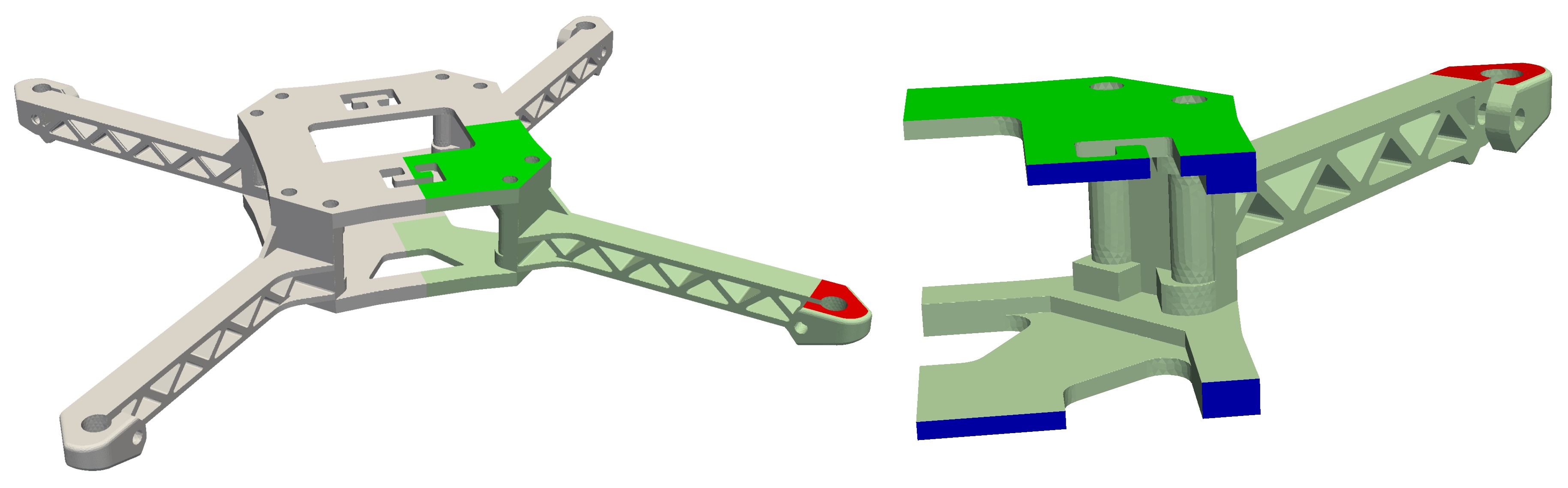
Loading (green), fixed (red) and symmetry (blue) surfaces
Step 1. Preparing case geometry
For convenience, we will set up the SOLIDS4FOAM_DIR variable to point to the solids4foam installation directory. Since this location is user-dependent, this will ensure that the subsequent commands are applicable to all users:
export SOLIDS4FOAM_DIR=<PATH_TO_SOLIDS4FOAM>
where you should replace <PATH_TO_SOLIDS4FOAM> with the location of the solids4foam directory on your system. Optionally, make it permanent by adding it to ~/.bashrc:
echo 'export SOLIDS4FOAM_DIR=<PATH_TO_SOLIDS4FOAM>' >> ~/.bashrc
source ~/.bashrc
Now, create a new directory for this case and navigate into it:
mkdir droneFrame
cd droneFrame
Download and unpack the geometry:
wget https://www.solids4foam.com/tutorials/archive/droneFrame.zip \
  && unzip droneFrame.zip && rm -rf droneFrame.zip
The geometry is provided as one STEP file, droneFrame.stp. Unlike an STL file, it describes the exact surfaces of the part, not a triangulation. The mesher reads the surfaces directly, and each CAD face keeps its own identity. We will use this identity in the next step to assign the boundary patches.
The geometry was prepared in Rhino from the full frame assembly, but other CAD software such as FreeCAD or Salome can also be used. The preparation consisted of three steps:
- The motors, propellers, battery, electronics and screws were removed. Only the two plates and the four arms remained.
- The plates and the arms were joined into one solid body. The bolted connections are not modelled, so the parts are bonded.
- The body was cut along the two symmetry planes, and one quarter was kept. The top face of the motor pad was split from the top face of the arm, so that the motor seat is a separate CAD face.
Before meshing, it is good practice to inspect the geometry. ParaView cannot open STEP files, so we use the Gmsh graphical interface instead:
gmsh droneFrame.stp
Gmsh reads STEP files through the OpenCASCADE geometry kernel. Make sureyour Gmsh installation includes OpenCASCADE support. The official binariesfrom gmsh.info do. You can check this with gmsh -info, which listsOpenCASCADE under Build options.
Before meshing, always inspect your CAD files for flaws like gaps,overlapping faces, non-manifold edges, or incorrect units. Fixthese in the CAD software. The mesher cannot fix them, and it will produce abad mesh or fail.
Step 2. Meshing using gmsh
Before meshing, we must populate the case directory with the necessary OpenFOAM files. The most efficient way to do this is to copy the structure from a similar tutorial case. Since our simulation assumes small deformations and a linear elastic material, the cases in solids4foam/tutorials/solids/linearElasticity are a good starting point. We will use the plateHole tutorial:
PLATE_HOLE=$SOLIDS4FOAM_DIR/tutorials/solids/linearElasticity/plateHole
cp -rL $PLATE_HOLE/{0,constant,system} .
cp constant/solidProperties.highOrder constant/solidProperties
cp system/fvSchemes.highOrder system/fvSchemes
cp system/fvSolution.highOrder system/fvSolution
rm -f system/blockMeshDict system/*.* constant/*.* constant/timeVsTraction
The plateHole case contains several variants of the solidProperties, fvSchemes and fvSolution dictionaries, distinguished by a suffix, and the files without a suffix are symbolic links to the segregated variants. The -L option of cp copies the files the links point to instead of the links themselves. We then overwrite these three files with the highOrder variants, which already contain most of the settings needed for this tutorial, and the last command removes the remaining variants and the blockMeshDict file, which are not needed here.
Gmsh is an open-source mesh generator. It can read STEP geometry directly and generate tetrahedral meshes. We control it with a script file, which we will call droneFrame.geo. Create this file in the case directory:
touch droneFrame.geo
and add the following content:
SetFactory("OpenCASCADE");
Merge "droneFrame.stp";          // geometry in millimetres

Mesh.CharacteristicLengthMin = 0.4;
Mesh.CharacteristicLengthMax = 1.0;
Mesh.CharacteristicLengthFromCurvature = 1;
Mesh.MinimumElementsPerTwoPi = 12;
Mesh.Algorithm   = 6;             // Frontal-Delaunay (2D)
Mesh.Algorithm3D = 10;            // HXT (3D)
Mesh.Optimize    = 1;
Mesh.OptimizeNetgen = 1;

// --- output ---
Mesh.ScalingFactor  = 0.001;      // mm -> m
Mesh.MshFileVersion = 2.2;        // format read by gmshToFoam

// --- boundary patches (CAD face tags from the STEP file) ---
symX()        = {9, 10, 43, 44};  // cut plane x = 0
symZ()        = {7, 8, 42};       // cut plane z = 0
plateTop()    = {35};             // top face of upper plate (y = 28.1)
plateBottom() = {179};            // bottom face of lower plate (y = 0)
motorPad()    = {203};            // top face of the motor pad (motor seat)
free() = Surface{:};
free() -= symX(); free() -= symZ(); free() -= plateTop();
free() -= plateBottom(); free() -= motorPad();

Physical Surface("symX")        = symX();
Physical Surface("symZ")        = symZ();
Physical Surface("plateTop")    = plateTop();
Physical Surface("plateBottom") = plateBottom();
Physical Surface("motorPad")    = motorPad();
Physical Surface("free")        = free();
Physical Volume("frame")        = Volume{:};
The script has four parts:
- Geometry. The SetFactory line selects the OpenCASCADE kernel, which is necessary to read STEP files. The Merge command loads the geometry.
- Mesh size. The cell size is between 0.4 mm and 1.0 mm. The arm has thin truss members of about 1.7 mm, so the upper limit of 1.0 mm gives at least two cells across each member. The
CharacteristicLengthFromCurvatureoption refines the mesh on curved surfaces, such as the holes, so that each full circle has at least 12 cells.Algorithm3D = 10selects the HXT algorithm, which is fast and robust for large tetrahedral meshes. - Output. The geometry is in millimetres, so
Mesh.ScalingFactorscales the mesh to metres when it is written. ThegmshToFoamutility reads the msh format version 2, so we setMesh.MshFileVersionto 2.2. - Boundary patches. Each boundary patch is a Physical Surface, a named group of CAD faces. The faces are identified by their tag in the STEP file. The last group, free, contains all faces that are not in another group. A Physical Volume is also necessary; without it, Gmsh does not write the cells.
To find the tag of a CAD face, open the geometry in the Gmsh graphicalinterface with gmsh droneFrame.stp. Select Tools > Options > Geometry andtick Surface labels under Visibility. The tag of each face is then shownin the graphics window. Alternatively, hover the mouse over a face and its tagis shown in the status bar.
The face tags are assigned by the OpenCASCADE kernel when the STEP file isread, and they can differ between Gmsh and OpenCASCADE versions. If thepatches do not look right after meshing, for example when checking them inParaView below, check the tags in the Gmsh graphical interface as described inthe tip above and update the lists in the script.
Now, run the mesher:
gmsh -3 droneFrame.geo -o droneFrame.msh
The -3 flag tells Gmsh to generate a 3D mesh. The mesh generation takes a few seconds, and the end of the output reports the mesh size:
Info    : Done meshing 2D (Wall 0.798737s, CPU 0.792499s)
Info    : Done meshing 3D (Wall 0.431752s, CPU 0.404607s)
Info    : 36428 nodes 198736 elements
The mesh is in the Gmsh msh format. We convert it to OpenFOAM format with the gmshToFoam utility:
gmshToFoam droneFrame.msh
The utility writes the mesh in the constant/polyMesh directory. Now we can inspect the mesh in ParaView. The touch command creates a dummy file that allows ParaView to recognise the folder as an OpenFOAM case:
touch case.foam && paraview case.foam
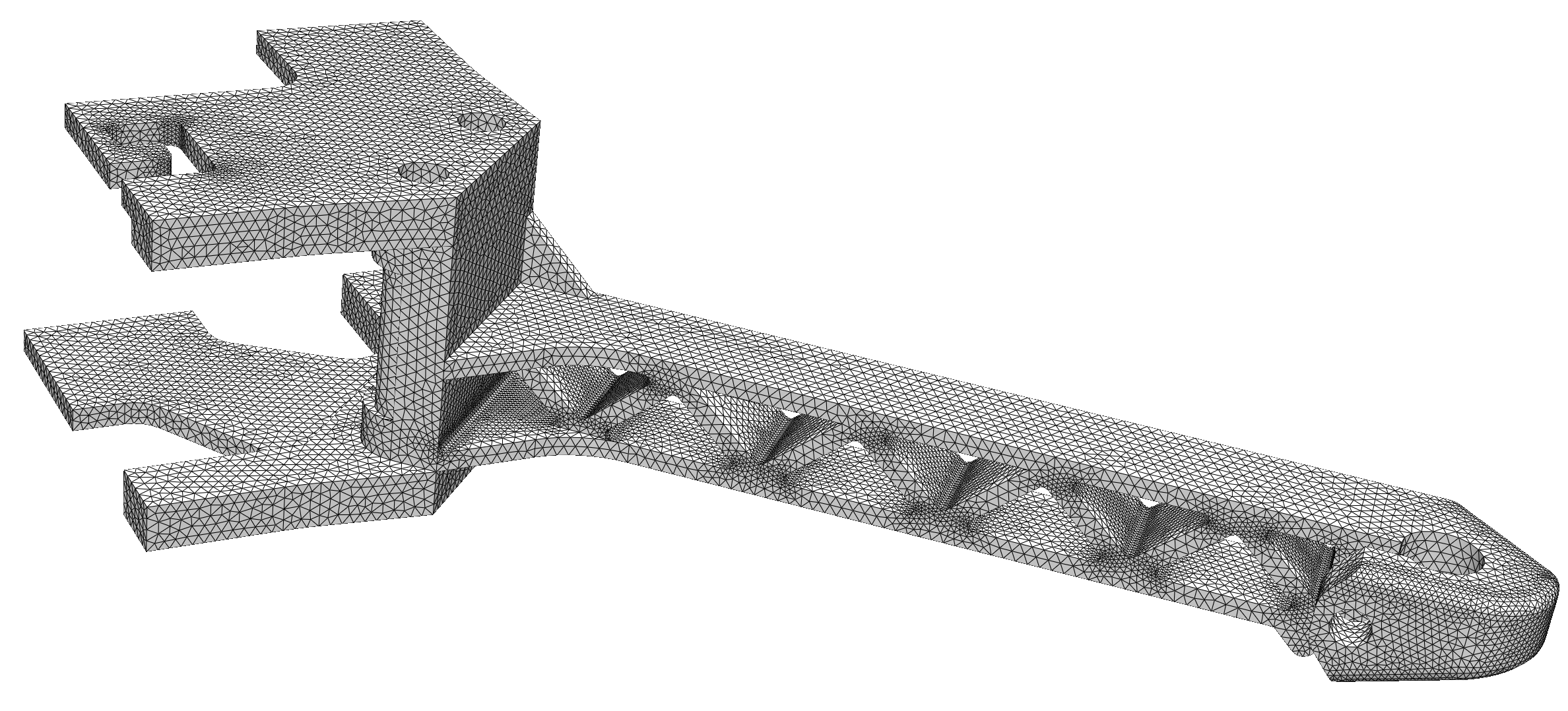
Computational mesh
After generating the mesh, one should always inspect the constant/polyMesh/boundary file. The gmshToFoam utility assigns the generic patch type to all patches. This is correct for the traction and displacement boundaries, but the two symmetry planes must have the symmetry type. We can change the type by editing the file, or with the foamDictionary utility, which is available in OpenFOAM.com and OpenFOAM.org, but not in foam-extend:
foamDictionary constant/polyMesh/boundary -entry entry0/symZ/type -set symmetry
foamDictionary constant/polyMesh/boundary -entry entry0/symX/type -set symmetry
The boundary file should now look like this:
6
(
    free
    {
        type            patch;
        physicalType    patch;
        nFaces          45539;
        startFace       256551;
    }
    symZ
    {
        type            symmetry;
        physicalType    patch;
        nFaces          254;
        startFace       302090;
    }
    symX
    {
        type            symmetry;
        physicalType    patch;
        nFaces          290;
        startFace       302344;
    }
    plateTop
    {
        type            patch;
        physicalType    patch;
        nFaces          2824;
        startFace       302634;
    }
    plateBottom
    {
        type            patch;
        physicalType    patch;
        nFaces          2596;
        startFace       305458;
    }
    motorPad
    {
        type            patch;
        physicalType    patch;
        nFaces          579;
        startFace       308054;
    }
)
Finally, we perform a formal quality check with the checkMesh utility:
checkMesh
From the output of checkMesh, we can see that the mesh passed the test and is OK for use:
...
Mesh OK.
Step 3. Preparing Case Files
With the mesh complete, we now need to configure the case files for the simulation.
Boundary and Initial Conditions
First, open the 0/D file to set the boundary and initial conditions for the displacement field D. We'll start with an initial condition of zero displacement for the entire domain:
internalField uniform (0 0 0);
Next, we define the conditions for each boundary patch inside the boundaryField dictionary. The setup is as follows:
symXandsymZ: These patches are the two cut planes. The symmetry condition sets the normal displacement and the shear traction to zero.motorPad: This patch is the motor seat on top of the pad. Zero displacement is prescribed on this patch.plateTop: The weight of the battery and the electronics acts on this patch. A pressure of 4.3 kPa is applied, which includes the load factor of 10.plateBottomandfree: These are free surfaces with no applied forces.
The final 0/D file should look like this:
boundaryField
{
    symX
    {
        type            solidSymmetry;
        patchType       symmetry;
        value           uniform (0 0 0);
    }
    symZ
    {
        type            solidSymmetry;
        patchType       symmetry;
        value           uniform (0 0 0);
    }
    motorPad
    {
        type            fixedDisplacement;
        value           uniform (0 0 0);
    }
    plateTop
    {
        type            solidTraction;
        traction        uniform (0 0 0);
        pressure        uniform 4300;
        value           uniform (0 0 0);
    }
    plateBottom
    {
        type            solidTraction;
        traction        uniform (0 0 0);
        pressure        uniform 0;
        value           uniform (0 0 0);
    }
    free
    {
        type            solidTraction;
        traction        uniform (0 0 0);
        pressure        uniform 0;
        value           uniform (0 0 0);
    }
}
Material and Solid Properties
Next, we need to adjust input dicts in the constant directory. Material properties are defined in constant/mechanicalProperties. We will specify the properties for ABS plus plastic:
planeStress     no;

mechanical
(
    ABSplus
    {
        type            linearElastic;
        rho             rho [1 -3 0 0 0 0 0] 1040;
        E               E [1 -1 -2 0 0 0 0] 2.5e9;
        nu              nu [0 0 0 0 0 0 0] 0.35;
    }
);
In the constant/solidProperties file, we select the solid mechanics model and the solution algorithm. We will use the linearGeometryTotalDisplacement model, which assumes small strains and rotations. Instead of the default segregated algorithm, we select the coupled PETScSNES algorithm. In addition, we switch on the high-order discretisation, which reconstructs the displacement field with quadratic polynomials instead of linear ones. The highOrder variant copied from the plateHole case already selects the PETScSNES algorithm and the high-order discretisation, so only the polynomialOrder and faceStencilExtraCells entries need to be changed. The file should read:
// linearGeometry: assumes small strains and rotations
solidModel     linearGeometryTotalDisplacement;

linearGeometryTotalDisplacementCoeffs
{
    // Solution algorithm: segregated (default) or PETScSNES (Newton)
    solutionAlgorithm    PETScSNES;

    // High-order (quadratic) reconstruction of the displacement field
    highOrderCoeffs
    {
        highOrderJacobian false;
        highOrderResidual true;

        displacement
        {
            polynomialOrder 2;

            faceStencilExtraCells 55;

            weightFunctionCoeffs
            {
                type radiallySymmetricExponential;
                k 6;
            }
            calcConditionNumber false;
        }
    }

    stabilisation
    {
        momentum
        {
            type        alpha;
            scaleFactor 0.1;
        }
    }
}
The highOrderCoeffs dictionary controls the high-order discretisation:
highOrderResidual trueevaluates the momentum residual with the quadratic reconstruction.highOrderJacobian falsekeeps the standard second-order Jacobian as the preconditioner, which is cheaper to assemble.polynomialOrder 2selects quadratic polynomials.faceStencilExtraCells 55sets the extra number of neighbour cells added to the stencil of each face for the reconstruction. TheplateHolecase uses cubic polynomials with 25 extra cells, but that case is two-dimensional. In 3D, a polynomial has more coefficients (10 for a quadratic, 20 for a cubic), so the least-squares fit needs a larger stencil, and the cost of a cubic reconstruction grows quickly. Quadratic polynomials with 55 extra cells give a well-conditioned fit on this tetrahedral mesh at an acceptable cost.weightFunctionCoeffssets the weights of the cells in the stencil. Cells further from the integration point get smaller weights.
The stabilisation dictionary adds a small numerical diffusion term to the discretised momentum equation to damp grid-scale (checkerboard) oscillations of the displacement field and to improve the conditioning of the system. The alpha term is built from the jump of the reconstructed displacement across each face, scaled by scaleFactor. For a smooth solution, this jump goes to zero as the mesh is refined, so the stabilisation is a property of the discretisation only: it vanishes in the limit of mesh refinement and does not change the governing equation. It should not be mistaken for physical damping or an additional material property.
Use only the alpha stabilisation with the high-order discretisation. Theother stabilisation types are designed for the standard second-orderdiscretisation and are not compatible with the high-order residual.
The PETScSNES algorithm and the high-order discretisation require asolids4foam build with PETSc support. If your build does not have it, setsolutionAlgorithm to implicitSegregated and remove the highOrderCoeffsdictionary to use the segregated algorithm.
The gravitational acceleration is set in the constant/g file. We apply the load factor of 10 to the gravitational acceleration, so that the frame is loaded with ten times its own weight. This represents the deceleration of the frame on landing:
dimensions      [0 1 -2 0 0 0 0];
value           (0 -98.1 0);
The other files in the constant directory (physicsProperties, dynamicMeshDict) can remain unchanged.
Numerical Schemes and Run-Time Control
In system/fvSchemes, the high-order discretisation requires the leastSquaresS4f scheme for the gradient of the displacement, and the Gauss linear scheme for the divergence terms. The highOrder variant copied from the plateHole case already contains these settings, so no changes are needed:
gradSchemes
{
    default                 none;
    grad(D)                 leastSquaresS4f;
}

divSchemes
{
    default                 none;
    div(sigma)              Gauss linear;
    div((impK*grad(D)))     Gauss linear;
}
In system/fvSolution, the D solver must be petsc when the PETScSNES algorithm is used. The options dictionary passes the settings to PETSc. This file is also copied from the highOrder variant and needs no changes:
solvers
{
    D
    {
        solver          petsc;

        options
        {
            snes_type newtonls;
            snes_monitor;
            snes_converged_reason;
            snes_mf;
            snes_mf_operator;

            ksp_type lgmres;
            ksp_gmres_restart "100";
            ksp_converged_reason;

            pc_type bjacobi;
            sub_pc_type lu;
            snes_lag_preconditioner_persists true;
            snes_lag_preconditioner "-2";
        }
    }
}
The main entries are:
snes_type newtonls: Newton method with a line search.snes_mfandsnes_mf_operator: the Jacobian-vector products are calculated matrix-free from the residual, and the assembled second-order matrix is used only as the preconditioner.ksp_type lgmresandpc_type bjacobi: the linear system in each Newton iteration is solved with the LGMRES method and a block Jacobi preconditioner with an LU factorisation in each block.snes_lag_preconditioner "-2": the preconditioner is assembled once and reused in all Newton iterations.snes_monitorand*_converged_reason: print the residuals and the convergence status to the log file.
In system/controlDict, we remove the libs entry and the forceDisp1 and plateHoleAnalyticalSolution1 functions, which were copied from the tutorial case. We keep the pointDisp function to monitor the displacement at a point, and set the point to the corner of the bottom plate at the centre of the frame:
functions
{
    pointDisp
    {
        type          solidPointDisplacement;
        point         (0 0 0);
    }
}
The endTime and deltaT entries remain 1, as we solve a static problem with one load increment.
Step 4. Running the Case
To run the case, we create an Allrun script in the case directory:
touch Allrun
Open the file and add the following content:
#!/bin/bash

# Source tutorial run functions
. $WM_PROJECT_DIR/bin/tools/RunFunctions

# Source solids4Foam scripts
source solids4FoamScripts.sh

# Check case version is correct
solids4Foam::convertCaseFormat .

# Generate the tetrahedral mesh with Gmsh (geometry in mm, mesh written in m)
solids4Foam::runApplication gmsh -3 droneFrame.geo -o droneFrame.msh

# Convert the Gmsh mesh to OpenFOAM format
solids4Foam::runApplication gmshToFoam droneFrame.msh

# Set the patch type of the symmetry planes (gmshToFoam makes all patches 'patch')
solids4Foam::requireGnuSed
"${SOLIDS4FOAM_SED}" -i \
    -e '/symX/,/}/ s/type            patch;/type            symmetry;/' \
    -e '/symZ/,/}/ s/type            patch;/type            symmetry;/' \
    constant/polyMesh/boundary

# Check the mesh quality
solids4Foam::runApplication checkMesh

# Create an empty file so ParaView recognises the case
touch case.foam

# Run the solver
solids4Foam::runApplication solids4Foam
The sed command replaces the foamDictionary commands from Step 2 and works with all OpenFOAM versions. It changes the type entry to symmetry inside the symX and symZ dictionaries of the boundary file. The solids4Foam::requireGnuSed function finds the GNU version of sed and stores its name in the SOLIDS4FOAM_SED variable. This is necessary on macOS, where the default sed uses a different syntax for in-place editing.
Make the script executable with the following command:
chmod +x Allrun
Now, you can run the entire simulation by simply executing the script:
./Allrun
To monitor residuals, we can open a new terminal and type the following command for live monitoring of the solver log file:
tail -f log.solids4Foam
Time = 1

Solving the momentum equation for D using PETSc SNES
Selecting least-squares reconstruction scheme movingLeastSquares
  0 SNES Function norm 7.314378885868e-02
    Linear solve converged due to CONVERGED_RTOL iterations 182
  1 SNES Function norm 1.388202771282e-02
    Linear solve converged due to CONVERGED_RTOL iterations 385
  2 SNES Function norm 1.261537438164e-07
    Linear solve converged due to CONVERGED_RTOL iterations 386
  3 SNES Function norm 4.247405433852e-11
  Nonlinear solve converged due to CONVERGED_FNORM_RELATIVE iterations 3
Max epsilonEq = 0.0010944
Max sigmaEq (von Mises stress) = 3.04001e+06
ExecutionTime = 312.59 s  ClockTime = 317 s

The momentum equation converged in all time-steps

End
...
The solver log file shows two levels of iterations:
SNES Function norm: This is the residual of the momentum equation at each Newton iteration. The problem is linear, so an exact Newton step would solve it in one iteration. Here, the Jacobian-vector products are approximated by finite differences (snes_mf) and the linear system is solved inexactly, so a few iterations are needed: the residual decreases by nine orders of magnitude in three iterations.Linear solve converged: This line reports the number of LGMRES iterations that the linear solver needed inside each Newton iteration. The linear system is solved to a relative tolerance of 1e-5, which is the PETSc default (ksp_rtol) and is not set infvSolution.
The run takes about five minutes on one core.
The pointDisp function object writes the displacement of the monitored point to the file postProcessing/0/solidPointDisplacement_pointDisp.dat:
# Time Dx Dy Dz magD
1 0 -0.000180531 0 0.000180531
The centre of the bottom plate moves down by 0.18 mm. The maximum displacement in the domain is 0.2 mm, at the centre of the top plate.
Step 5. Analysing the Results
Once the simulation is complete, open the results in ParaView:
paraview case.foam
The computational domain is one quarter of the frame. To view the full frame, we mirror the results across the two symmetry planes with the Reflect filter, applied once for each symmetry plane. When reflecting a vector field such as D, tick the Flip All Input Arrays option, so that the mirrored displacement points in the correct direction.
With the full frame reconstructed, we warp the geometry by a scaled displacement field using the Warp By Vector filter, where the D displacement field is selected as the Vector. A Scale Factor of 1 shows the true deformation, which is too small to see. In this case, a Scale Factor of 25 allows the deformation to be seen. To compare the deformed shape with the original geometry, show the output of the Reflect filter as Wireframe and reduce its opacity.
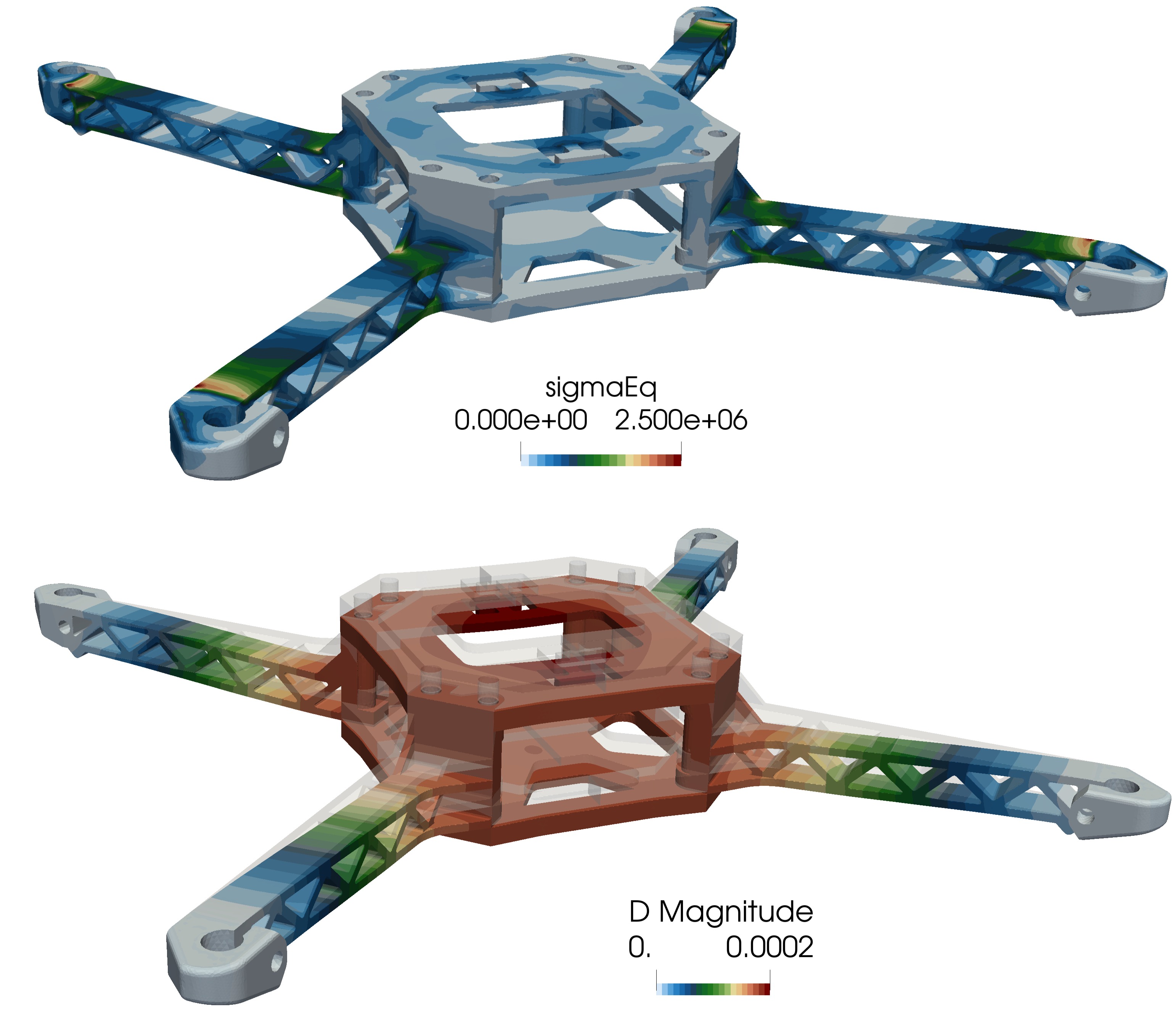
Deformed geometry (scale factor 25) coloured by displacement and stress
The colour scale of the von Mises stress is limited to 2.5 MPa, so that the stress distribution along the arms is better visible. The highest von Mises stresses occur at the two ends of each arm: where the arm joins the centre body and where the arm joins the motor pad. The chords of the truss carry most of the bending load, while the diagonal members are lightly loaded. The maximum von Mises stress is 3.0 MPa, which is well below the tensile strength of ABS plus plastic of about 30 MPa. A hard landing with a load factor of 10 does not damage the frame.
Comparison with CalculiX
To check the results, the same case was solved with the open-source finite element code CalculiX (version 2.16). The same Gmsh mesh was used, exported with quadratic tetrahedral elements (C3D10), with the same boundary conditions, loads and material properties. The table below compares the displacements at two points of the frame:
| Location | solids4foam | CalculiX | Difference |
|---|---|---|---|
| Centre of the top plate (maximum) | 0.2009 mm | 0.1977 mm | 1.6 % |
| Centre of the bottom plate (0 0 0) | 0.1805 mm | 0.1778 mm | 1.5 % |
The next table compares the von Mises stress on the top surface of the arm at three positions along the arm, measured from the centre of the frame. The values are away from the stress concentrations at the ends of the arm:
| Position along the arm | solids4foam | CalculiX | Difference |
|---|---|---|---|
| 45 mm | 0.52 MPa | 0.56 MPa | 7.1 % |
| 65 mm | 0.68 MPa | 0.68 MPa | 0.0 % |
| 75 mm | 1.23 MPa | 1.30 MPa | 5.4 % |
The displacements agree within 2 % and the stresses along the arm differ by up to 7 %. Part of the difference comes from the way the stress is sampled: solids4foam reports cell-centre values, while CalculiX extrapolates the integration-point stresses to the surface nodes. The rest is most likely discretisation error. Both results were obtained on a single mesh, and neither has been shown to be mesh-independent or checked to be in the asymptotic range of convergence. The two codes discretise the equations differently, so their errors on the same mesh are different, and a part of the difference in the tables is expected to disappear with mesh refinement.